
In this blog, the Service Design Team shares how we improved the mid-year review experience. Our goal was to make sure Beacon provides useful check-ins throughout the year, not just at annual review time.
Understanding the Mid-Year Review Experience
In an earlier blog, we shared how Seattle IT redesigned the annual performance review in Beacon, IT’s performance management app. We teamed up again with Organizational Change Management (OCM) and Workforce Development to redesign the mid-year review experience also. The goal of the mid-year check-in was to help managers and employees stay connected on goals, progress, and growth.
We started by reviewing feedback from staff who joined early talks about quarterly reviews. Their input was clear and consistent:
- Quarterly reviews felt like “too much of a lift.” Employees and managers said the process felt heavy for something meant to be quick and supportive.
- People wanted to avoid surprises at the annual review. Staff said regular check-ins should be used to bring up issues early. They did not want a “big reveal” at the end of the year, which sometimes happened in the past.
These two points set the direction for our design work: staff felt the process took too much effort. At the same time, they did not want problems to build up until year-end. Our goal was to create a tool that makes reviews lighter and clearer, supports real conversations, and meets staff needs.
Initial Design and Prototype
A Lighter, More Flexible Flow
Our first idea was to offer two short coaching sessions each year before the annual review. These sessions would fit into regular one-on-one meetings. They offer a simple moment to get on the same page, instead of extending the review process. This change responded directly to feedback that mid-year reviews felt like “too much of a lift.” It also helped turn the experience into a real conversation rather than a formal evaluation.
Clearer Guidance Throughout the Experience
We added three new features:
- Discussion prompts to guide the conversation and help managers and employees focus on what matters most
- Note-taking tools that let both people record their thoughts, read each other’s notes, and save them for the annual review
- Goals and shared background to help staff connect the conversation to their current work and expectations
We expected these features would help staff see how the sessions support coaching and alignment and avoid surprises at the annual review.
Testing With Users
To test our ideas, we held moderated usability testing sessions where people tried out the new tool while our team watched and asked questions. Participants included the Human Resources and Labor Relations teams, along with seven employees and managers from across Seattle IT. We wanted to make sure the new experience met their needs.
We asked participants to share feedback and complete tasks in the new tool, such as:
- Talking about their experience with past mid-year reviews and the new process
- Reviewing the discussion prompts
- Writing notes from the conversation
- Submitting their notes
Key Insights and How We Addressed Them
Most participants moved through the new process in Beacon with ease. Several said, “this might be a model to consider for the year end (annual review).” Testing also revealed two main areas that needed work.
Finding 1: The Note-Taking Steps Were Unclear
What we learned: Six out of seven participants had trouble with the summary text boxes. They were unsure whether to take notes during the conversation or after it. They also did not know how to see each other’s notes.
What we heard: “I think it’d be nice to have something open in parallel… so you can capture keywords from the conversation rather than going through four different questions and now having to summarize.” (Staff participant)
How we fixed it:
- Updated the wording on the sync button so people can easily view each other’s notes
- Added guidance on what to write in the summary text boxes
- Added clear steps for taking notes and reviewing them
Finding 2: The Session Needed to Feel More Like a Conversation
What we learned: Participants said the session should feel like a conversation, not like filling out a form. They wanted prompts with a clearer purpose and timing. They also wanted to know who does what and what happens next. The tool needed to guide the discussion without taking it over.
What we heard: “If the point is we want to have regular easy conversations, then we want to minimize how much of that effort is dealing with a form.” (Staff participant)
How we fixed it:
- Rewrote the discussion prompts to focus on coaching and alignment
- Removed the checkboxes for each prompt so the tool feels less like a form
- Marked prompts as optional so staff can use only the ones that help their conversation
- Added clearer steps for each role and messaging about next steps
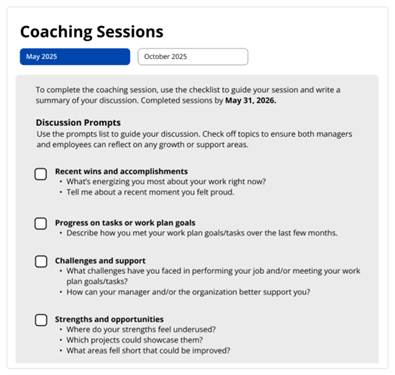
Figure 1. Early prototype of the coaching session model, showing the rigid flow and first prompts designed to support alignment conversations.
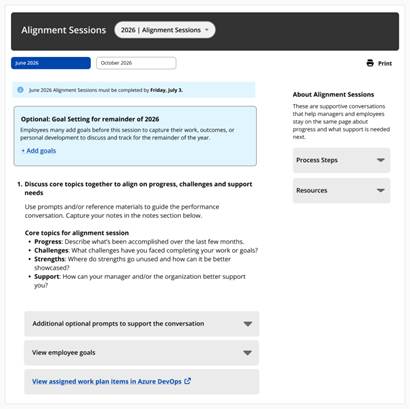
Figure 2. Updated Alignment Sessions design after testing, with clearer prompts and simpler steps to support conversation-first alignment.
What Worked Well
Participants also shared positive feedback about the new experience:
- Less effort: Staff liked the lighter process and appreciated that it felt less formal.
- One shared tool: Participants strongly supported using one standard performance management tool across the department.
- Helpful prompts: Staff saw the discussion prompts as useful conversation guides that match how managers already talk with their teams.
- Teamwork: Testers said the tool supported honest, two-way conversations.
Final Design and Launch
The Service Design team worked with the developer to build the redesigned experience, with a focus on ease of use and clarity. Based on testing feedback, we also renamed the experience from Coaching Sessions to Alignment Sessions to better reflect its purpose. The final design supports two short conversations each year. Giving managers and employees a simple, repeatable way to stay aligned without extra work.
Early survey results show this approach is working. Staff reported greater clarity and a stronger connection with their managers. With annual reviews coming up, we hope the new process also supports one of our first goals: helping avoid surprises at year-end.
Alignment Sessions now serve as a model for how Beacon can keep improving performance management all year long. This work will shape future updates to annual reviews, goal setting, and ongoing coaching.
What Comes Next
Our next step is to improve the fall Alignment Session, which usually takes place in the last quarter of the year. This session focuses on setting goals and expectations. It will follow the same approach: clear guidance and a focus on conversation. We will clarify the guidance for managers and employees and make sure the process supports a quick, simple check-in that keeps everyone aligned throughout the year. This round of work will help us test the model and guide future improvements across Beacon.
This blog post is part of a series that highlights new Seattle IT projects making a difference across the City of Seattle. Each post offers a behind-the-scenes look at the work of different teams, the challenges they face, and the solutions they build to improve experiences for staff and the communities we serve. This is the third post in the series from the Service Design team.
You can read the first two blogs here:
- Automating HR Leave and ADA Requests at Seattle IT
- Beacon Performance Management: How Seattle IT Built a Custom Performance Management Tool Amidst Constraints
The Service Design Team, based in Seattle IT, uses human-centered design to improve tools and processes for both the public and City staff. The team helps connect organizational goals with the needs of residents and employees.